
Understanding Data Block Creation
Data blocks are created every hour and is partitioned by the total number of tags being stores per block. If more than 20000 tags are being stored in a block, the block will be split into multiple blocks per hour.
If 100,000 tags being logged, every hour will produce 5 data block files. It is recommended to not exceed 100,000 tags per dataset
The blocks are also split up based on the data type of the tag. String tags will be stored into a block file with a .object extension and numerical tags will be logged into a .data block file.
Depending on the amount of blocks to write, a controlled shutdown might need more time to complete the operation. In a Docker environmentornment, this can be controlled by your docker yaml file: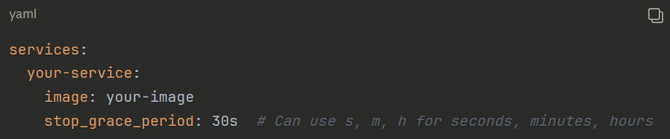
For Windows you might need to tweak the following registry setting:
HKEY_LOCAL_MACHINE\SYSTEM\CurrentControlSet\Control\WaitToKillServiceTimeout
By default, this is set to 20000 milliseconds.
The recommendation would be to set this to 30 seconds.
Growth Estimation
Appropriately accounting for the future growth of a data historian can be very complicated and requires the consideration of several variables, including
- Number of tags
- The frequency of data changes
- The type of data being logged
- Sample Rates
If data logging has already begun, a better way of predicting disk space is to find the average file size of a week or month's worth of data for each data set, then multiplying it out over a given time period.
Number of Tags
Perhaps the most obvious of the factors that influence growth is the total number of tags . A tag, sometimes referred to as a data-point, is a uniquely identified point of data collection from a field device such as a sensor. A tag consists of a collection of timestamps, values, and quality scores.
The Frequency of Data Changes
The Timebase Time Series Historian store values as 'Delta', thus, the Historian does not log a tag value that does not change from the previous value. Understanding how often your tags change helps predict how much storage space is needed. In most real-world environments, the majority of tags do not change as often as they are scanned.
Data Type
The type of data stored must be considered when calculating disk space. The Historian supports data types from single Booleans, Floats, and String values. String values will use the same amount of storage as a number data type plus the size of the string characters making up the string.
Estimation example on Numerical Data
Please see the following link to our sizing estimator tool
This includes tag data of type Double, Integer and Boolean
Example - 10,000 tags changing every second will consume 820mb of data per day.
| Amount of Tags | Frequency of Change | Change Percentage | Duration | Storage Requirements |
| 10,000 | 1 s | 10% | 1 d | 1071mb |
The Real Time Historian will only store data if the subsequent data point changes on change, i.e delta storage. This size estimate calculation assumes that every second will be a different value to store.
Performance Benchmarks
The following stress tests was conducted on 2 AWS EC2 instances:
m6i.xlarge - 4vCPUs - 16GiB memory - 3000 IOPS data disk (data volume separate to OS volume
- 10 datasets x 50k tags each = 500k tags total (all tag data types were double)
- 100k TVQs write per second
- Used 80% CPU consistently
- Used 105GB storage per day
m6i.2xlarge - 8vCPUs - 32GiB memory - 3000 IOPS data disk (data volume separate to OS volume
- 10 datasets x 100k tags each = 1m tags total (all tag data types were double)
- 100k TVQs write per second
- Used 50% CPU consistently
- Used 105GB storage per day